MSW 활용기 | (3) Plugin 방식으로 제공하기
MSW 활용기 | (3) Plugin 방식으로 제공하기
📌 이 글은 MSW 시리즈 중 3편입니다.
1편: MSW란?
2편: Mock API Schema 자동 생성하기
부제: MSW를 어떻게 해야 편하게 쓸 수 있을까
MSW 기능을 구현했다고 해도, 실질적으로 쓰기 편해야 팀원들이 활용할 수 있습니다. 그래서 이번 글에서는 현재 프로젝트에서 사용 중인 modulesPlugin 패턴을 참고해, Vue Plugin 방식으로 MSW를 제공하는 방법을 정리했습니다.
즉, main.js에 mswPlugin을 설치하고, 하위 컴포넌트에서는 필요한 함수를 바로 사용할 수 있도록 구성합니다.
기능 구현
아래는 mswWorkerPlugin.js의 핵심 코드입니다.
1
2
3
4
5
6
7
8
9
10
11
12
13
14
15
16
17
18
19
20
21
22
23
24
25
26
27
28
29
30
31
32
33
34
35
36
37
38
39
40
41
42
43
44
45
46
47
48
49
50
51
52
53
54
55
56
57
58
59
60
61
62
63
64
65
66
67
68
69
70
const worker = setupWorker();

// MSW 시작
const setupMSW = () => {
  if (typeof window !== "undefined") {
    worker.start({ onUnhandledRequest: "bypass" });
  }
};

// JSON Schema를 기반으로 가짜 데이터를 생성
export const generateFakeData = schema => {
  const fakeData = jsf.generate(schema);
  return fakeData;
};

// 파일 여부 확인 후 가짜 데이터 반환
const setMockData = async (apiPath, method = "get") => {
  let schema;
  const filePath = apiPath.replace(/\//gi, "_");
  await import(`@/mocks/apiSchema/*/${filePath}.json`)
    .then(res => {
      schema = res.default;
    })
    .catch(() => {
      console.warn(`파일 없음 또는 오류 발생: ${apiPath}`);
    });

  if (!schema) {
    schema = await getSchema(apiPath, method);
  }

  return () => {
    return HttpResponse.json({ ...generateFakeData(schema), returnCode: "200" });
  };
};

// Vue Plugin 정의
const mswPlugin = {
  install(Vue) {
    setupMSW(); // install 시 MSW Enable
    Vue.prototype.$mswPlugin = {
      async setupHandler(apiPath, method, resolver) {
        worker.use(...(await this.setHandlers(apiPath, method, resolver)));
      },
      resetHandler(handlers = []) {
        worker.resetHandlers(...handlers);
      },
      stopMSW() {
        worker.stop();
      },
      async setHandlers(apiPath, method = "get", resolver) {
        const handlers = [];
        try {
          const path = apiPath.match(/\/display(\/[^?#]*)/);
          apiPath = path ? path[1] : apiPath;
          const handler = http.get(
            `*${apiPath}`,
            resolver ? resolver : await setMockData(apiPath, method.toLowerCase())
          );
          handlers.push(handler);
        } catch (error) {
          console.error(`Handler 생성 실패: ${apiPath}`, error);
        }
        return handlers;
      }
    };
  }
};

export default mswPlugin;
사용법 및 예시
1. Plugin 등록
1
2
3
// main.js
import mswPlugin from "@/mocks/mswWorkerPlugin.js";
Vue.use(mswPlugin.install);
2. 기본 사용 예시
1
2
3
4
5
6
7
import handlers from "@/mocks/handlers/sample.handler.js";

async created() {
  await this.$mswPlugin.setupHandler(this.data.asyncUrl);
  await this.$mswPlugin.setupHandler("/api/data", "GET", await handlers.test(apiUrl));
  await this.$mswPlugin.setupHandler("/api/data2", null, handlers.setData);
}
3. 커스텀 Handler 작성
1
2
3
4
5
6
7
8
9
10
11
12
13
14
15
16
17
18
19
20
21
22
23
24
import { HttpResponse } from "msw";
import { getSchema } from "@/mocks/getApiSchema.js";
import { generateFakeData } from "@/mocks/mswWorkerPlugin.js";

const handlers = {
  setData: () => {
    return HttpResponse.json({ data: { name: "hi", returnCode: "200" } });
  },
  async test(path) {
    const schema = await getSchema(path);
    let mockData = generateFakeData(schema);

    // List 길이가 3 초과 시 잘라내는 예시 로직
    if (mockData.data.tabList.length > 3) {
      mockData.data.tabList = mockData.data.tabList.slice(0, 1);
    }

    return () => {
      return HttpResponse.json({ ...mockData, returnCode: "200" });
    };
  }
};

export default handlers;
결과물
아래는 실제 적용 후 캡처 화면입니다.
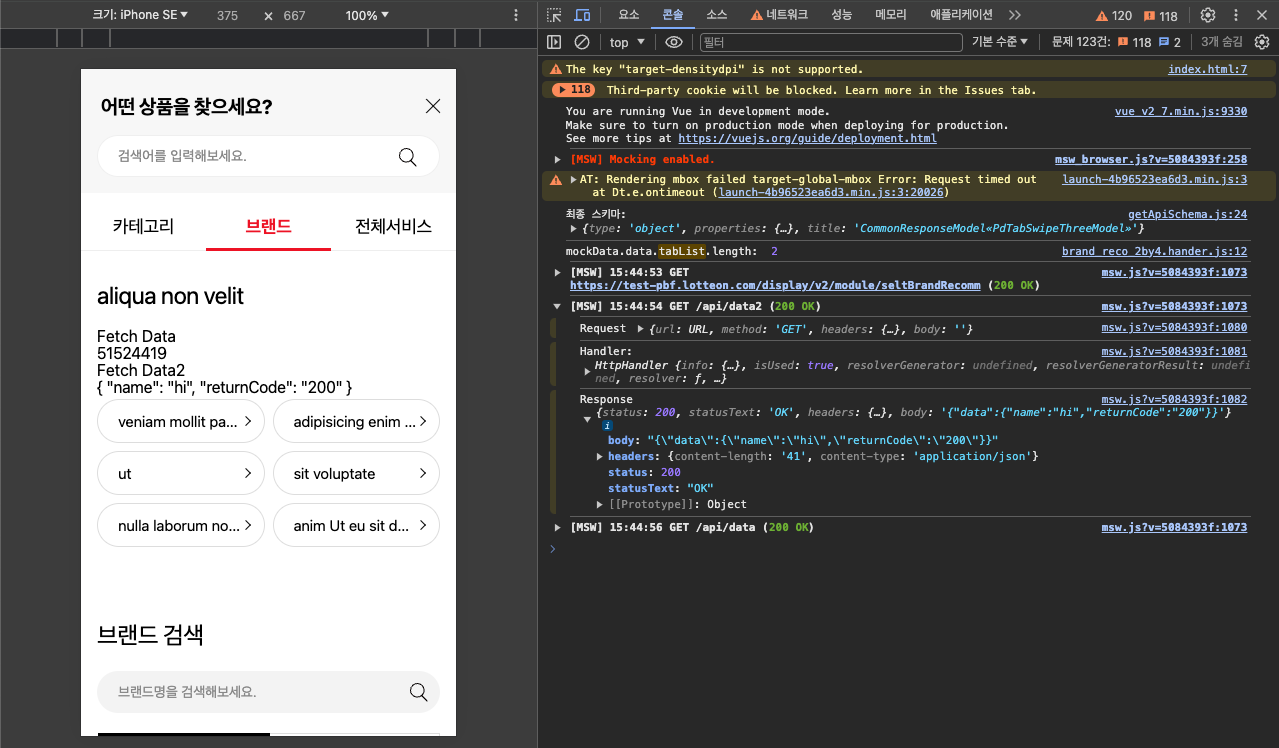 MSW Plugin 적용 후 네트워크 탭
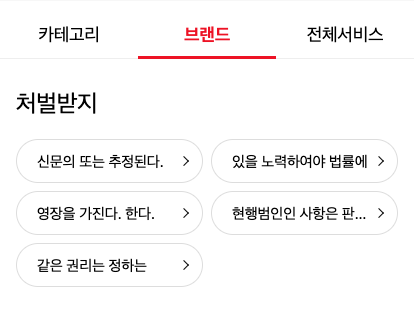 MSW Plugin으로 Mocking된 데이터
정리
mswPlugin으로 MSW를 Vue Plugin 방식으로 제공합니다.- 팀원들이 복잡한 설정 없이,
this.$mswPlugin.setupHandler()형태로 바로 사용할 수 있습니다. - 커스텀 핸들러 작성이 가능해 확장성을 확보할 수 있습니다.
이 기사는 저작권자의 CC BY 4.0 라이센스를 따릅니다.